Describe a video.
Autochrome makes it.

Three steps. Minutes, not weeks.

Chat plans the cut, the storyboard lets you shape it, and the timeline lets you take it apart.

01

Chat

Describe the video in plain language. The chat plans the scenes and shot list with you.

02

Storyboard

Autochrome turns the plan into a sequence of frames for every scene. Critique and refine the details, then regenerate any frame until it's right.

03

Video

Watch the whole thing come together on the timeline — then fine-tune the cut with the editing tools you already know.
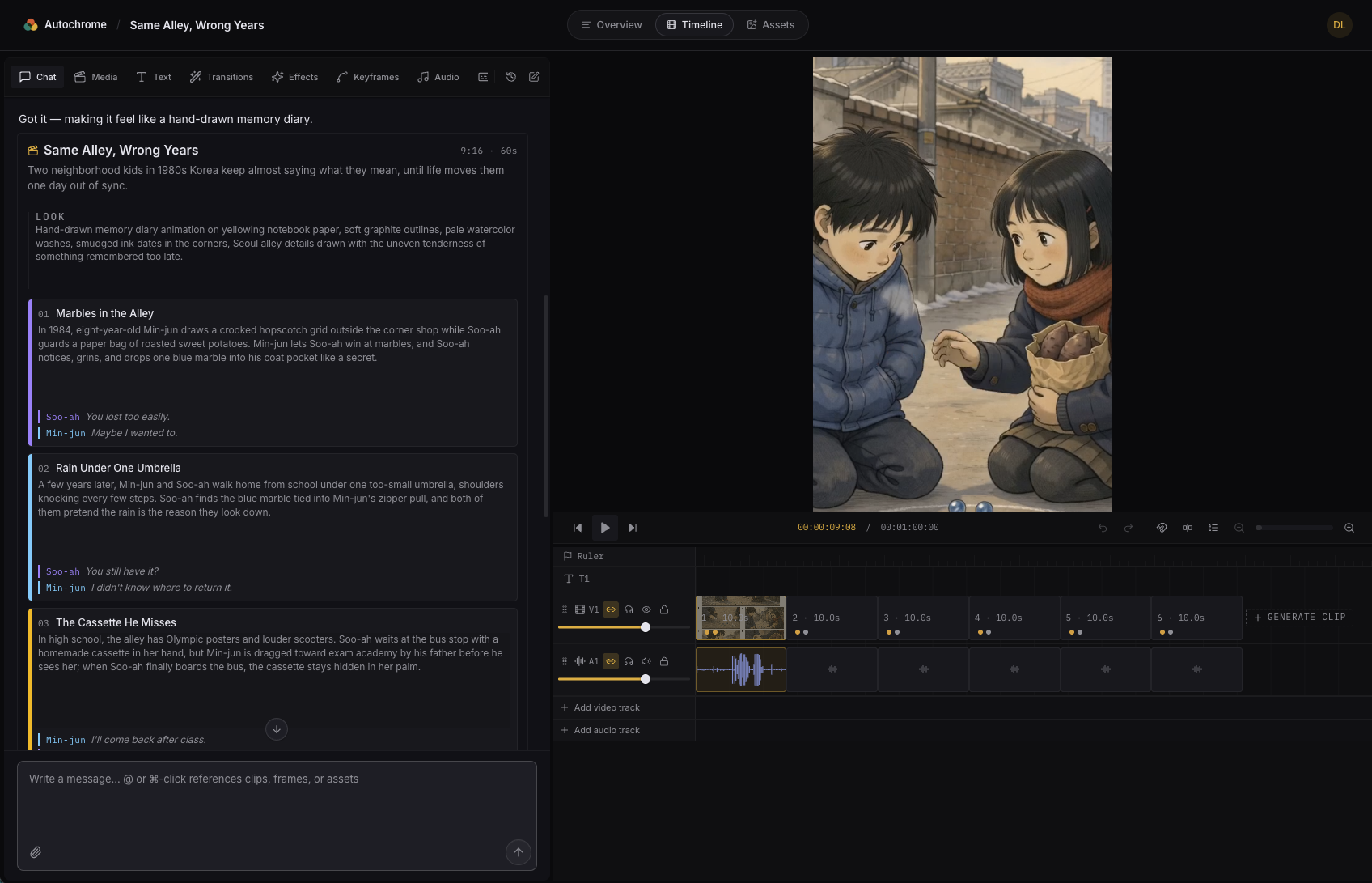
The Autochrome editor — chat on the left planning a hand-drawn memory-diary short, with the video preview and timeline on the right.

Pricing

Free

$0/mo

  • 200 render credits per month
  • Standard-quality renders
Start free
Starter

$29/mo

  • 5,500 render credits per month
  • HD-quality renders
  • 100 GB of cloud storage
  • Commercial use rights
Choose Starter
Most popular
Pro

$99/mo

  • 20,000 render credits per month
  • HD-quality renders
  • 500 GB of cloud storage
  • Commercial use rights
  • Discounted top-up credits
Choose Pro

Ready to make your first video?